ONLINE RADIO
Find your frequency.
Listen to radio stations worldwide or create your own: music, a presenter’s voice, live video and an invited guest in one studio.
Find your mood

MUSIC FOR THE ROADThe city at your
rhythm.Find your station ↗
rhythm.Find your station ↗

JAZZ AND IMPROVISATIONNo need to
rush.Play jazz ↗
rush.Play jazz ↗

MUSIC TO UNWINDPause the world.
Keep the music.Find a relaxing station ↗
Keep the music.Find a relaxing station ↗

MUSIC FOR WORKFind
your focus.Choose a station ↗
your focus.Choose a station ↗
GOOD MORNINGA new day.
A new rhythm.Choose a station ↗
A new rhythm.Choose a station ↗

PARTY TIMETurn it up.
Bring friends closer.Choose a station ↗
Bring friends closer.Choose a station ↗
NONSTOP ROCKGuitars.
Attitude.Choose a station ↗
Attitude.Choose a station ↗
CLASSICAL MUSICTimeless.
On your radio.Choose a station ↗
On your radio.Choose a station ↗
ELECTRONIC MUSICTune in to
the future.Choose a station ↗
the future.Choose a station ↗


YOUR STATION
Create your own internet radio
Music, your voice and live video in your station’s studio. Check your camera and microphone before going live.
LIVE CONVERSATION
Invite a guest to your video broadcast
A private link for one guest, a backstage conversation and the moment to go live under your control. Guests can open the invitation in their phone’s browser.

LIFE ON AIR
Radio news

Hellfest announces its full anniversary lineup for 2027
Hellfest announced its full anniversary lineup on November 26. The festival is due to take place in Clisson, France, from June 17 to 20, 2027. Gojira, Blink-182, Evanescence and Mötley Crüe are among the main acts. The organisers had previo

Patti Smith makes her debut on NPR’s Tiny Desk
NPR Music published Patti Smith’s first Tiny Desk Concert on November 25. The recording runs through four songs. Smith opened with Nine, followed it with Fireflies and Peaceable Kingdom, and closed the short set with People Have the Power.

HYUKOH release 33 and a video for Weight of Denial
South Korean group HYUKOH released 33 on November 25. Japanese music outlet DIGLE reports that it is the band’s first full-length release under its own name in six years. The album arrived alongside a music video for Weight of Denial. The r
BOTH SIDES OF RADIO
Listen. Connect.
Create your own.
Find your favorite station or become the one people tune in to every day. Everything you need to know about internet radio is here.
Listen to online radio
Start with a favorite genre, a familiar name or your mood. Open a station, explore its programming and save it to your favorites to find it again easily.
Choose and play a stationInvite a guest to your video broadcast
A private link for one guest, a backstage conversation and the moment to go live under your control. Guests can open the invitation in their phone’s browser.
From idea to first broadcastFind your station
Internet radio goes beyond familiar names. Discover independent broadcasts, choose music by genre or find a show in your preferred language. Search if you know the name. To discover something new, start with genres or mood collections.
A steady musical backdrop can suit work, a livelier sound can accompany your journey, and a talk show may be just right for the evening. A station’s description helps you understand its format before you listen. Country and language narrow the choice, but your musical taste still matters: one country can have very different stations.
Two ways to broadcast
Zvukradio includes added stations with existing external streams and stations created by users on the service. Added stations already broadcast on another platform. Stations created here have a studio, media library, AutoDJ and a presenting team.
If you already have a station, start by adding its stream to the catalogue. If you have an idea but no station yet, read the guide to creating a radio station. It will help you choose a format, gather your material and prepare a test show.
Radio is about people
Station chat lets you discuss music and ask the presenter a question. Emoji and GIFs help you share your mood. Stations created on the service also offer song requests and requests to call the show. To join by voice, the presenter must enable calls and accept your request.
Want to take the microphone yourself? Learn about presenting a show and preparing your first broadcast. A clear topic, a prepared playlist and tested audio are a good start. You can grow your team and programming over time.
Radio FAQ
How do I invite a guest and bring them on air?
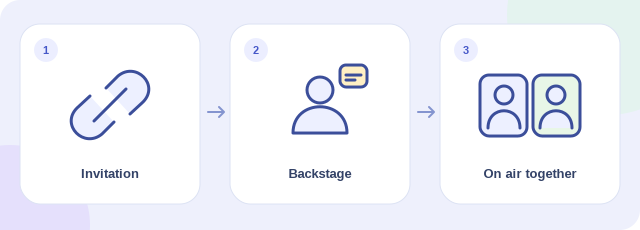
- Send the private link
- Talk backstage
- Bring the guest on air
After checking your devices, choose Invite a guest and share the private link with that person. The guest checks their camera and microphone, then joins you backstage. Joining does not put them in the public broadcast: the presenter chooses Bring guest on air separately. You can return the guest backstage or disable their audio or video. One guest can join the current session; the invitation lasts eight hours. Requesting the link again returns the same invitation. Revoking it disconnects the guest and invalidates the old link. Ending the video broadcast closes the session. Live video instructions →
How do I listen on my phone?
Open the catalogue in your mobile browser, choose a station and press Play. Check the volume and any connected headphones. Background playback depends on your device and browser. Mobile listening guide →
Is creating a radio the same as adding a station?
No. Adding a station uses an existing external audio stream. Creating one gives you your own station with the service’s broadcasting tools. Compare the options →
What do I need for my first broadcast?
Prepare your show topic, music and a device for using the studio. For a talk show, check your microphone and headphones. Before going live, test the broadcast as a listener. Set up your audio →
Can I listen and broadcast in this version?
The catalog includes stations from Zvukradio and Radio Browser. Playback depends on the stream and browser. Manage your stations and broadcasts in your account.