
Choose a format and a manageable first programme
Describe the station in one sentence, then decide the balance of speech and music, broadcast language and realistic frequency. One prepared show is a better learning opportunity than an unsupported promise of continuous broadcasting.
Choose the right type of station
Create a station when you want the platform’s studio, media library, AutoDJ and presenter team. Add a station when an external audio stream already exists. Adding a stream does not move its broadcasting infrastructure to Zvukradio.
Prepare the page and programme
Use a recognisable name and a clear description. Select genres, country and language that match the actual programme. Prepare a running order and extra material in case a conversation ends early.
- Check the name, short page address and contact details.
- Use an identifiable image and a useful format description.
- Review track beginnings, endings and relative volume.
- Plan the introduction, music blocks, discussion and ending.
Prepare the studio and team
The owner manages the station and team; presenters use the studio within their assigned role. Agree who starts and ends the programme, follows chat and handles requests. Check the microphone and headphones and compare voice and music levels from a listener’s device.
Rehearse the whole sequence
Test starting, changing sources and ending, including a call if you intend to use it. A call request must be accepted before a listener can join. Verify audible output on a connected broadcast server, not merely a changed button label.
Create a station and prepare your first broadcast
Open My stations, create a radio station and add its name and description. Open the studio, prepare your music and check the sound from a second device on the station page. Choose a suitable plan before launch: AutoDJ is not included in the free plan.
Live video for your radio station
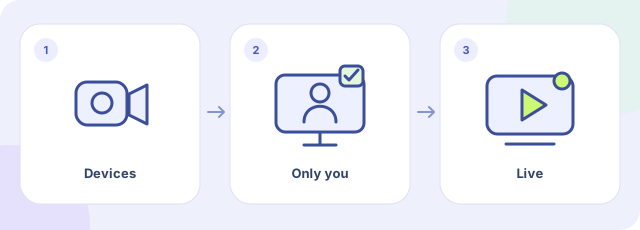
- Choose devices
- Check the private preview
- Start the video broadcast
Open My stations, your created station’s studio and the Management tab. In Live video, open Camera and microphone, select the devices and click Check camera and audio. Allow access in the browser and check the private preview. Viewers cannot see you during this check. Start video broadcast makes the video public on the station page. Use headphones and check the viewer’s page too. This control is for stations created on Zvukradio, not external streams added to the catalogue.
Frequently asked questions
Can I create a station without an existing stream?
Yes. Create a station on Zvukradio and use its studio. Adding an external station is the option for an audio stream that already exists.
How much does it cost?
There is a free plan and paid plans with different limits. AutoDJ is not included in the free plan. See Pricing for current prices and the features of each plan.
Can I broadcast without a live presenter?
Use a prepared playlist and AutoDJ on a plan that includes it. After starting, check playback and track transitions from a listener’s device.