YOUR STATION
Create your own internet radio
Music, your voice and live video in your station’s studio. Check your camera and microphone before going live.
ONLINE RADIO
Listen to radio stations worldwide or create your own: music, a presenter’s voice, live video and an invited guest in one studio.



Loading catalogue…
Try different filters or a different search.
YOUR STATION
Music, your voice and live video in your station’s studio. Check your camera and microphone before going live.
LIVE CONVERSATION
A private link for one guest, a backstage conversation and the moment to go live under your control. Guests can open the invitation in their phone’s browser.

LIFE ON AIR

The BBC put U2’s Tate Modern concert at the centre of its November 28 evening schedule. The band recorded the programme at the London gallery on November 3, with BBC Radio 2’s Jo Whiley presenting. BBC Two and BBC iPlayer scheduled it for t

Danish producer MORTEN and French DJ David Guetta released ‘London’ on November 27 with British rapper Tinie Tempah. The single arrived through Spinnin’ Records under the producers’ Future Rave imprint. The release pairs a main version that

Jorja Smith released an expanded edition of What Are The Odds through FAMM on November 27. Titled The Afterparty, it builds on the British singer’s third album, originally released on August 21. The first twelve tracks remain in their origi
BOTH SIDES OF RADIO
Find your favorite station or become the one people tune in to every day. Everything you need to know about internet radio is here.
Start with a favorite genre, a familiar name or your mood. Open a station, explore its programming and save it to your favorites to find it again easily.
Choose and play a stationA private link for one guest, a backstage conversation and the moment to go live under your control. Guests can open the invitation in their phone’s browser.
From idea to first broadcastInternet radio goes beyond familiar names. Discover independent broadcasts, choose music by genre or find a show in your preferred language. Search if you know the name. To discover something new, start with genres or mood collections.
A steady musical backdrop can suit work, a livelier sound can accompany your journey, and a talk show may be just right for the evening. A station’s description helps you understand its format before you listen. Country and language narrow the choice, but your musical taste still matters: one country can have very different stations.
Zvukradio includes added stations with existing external streams and stations created by users on the service. Added stations already broadcast on another platform. Stations created here have a studio, media library, AutoDJ and a presenting team.
If you already have a station, start by adding its stream to the catalogue. If you have an idea but no station yet, read the guide to creating a radio station. It will help you choose a format, gather your material and prepare a test show.
Station chat lets you discuss music and ask the presenter a question. Emoji and GIFs help you share your mood. Stations created on the service also offer song requests and requests to call the show. To join by voice, the presenter must enable calls and accept your request.
Want to take the microphone yourself? Learn about presenting a show and preparing your first broadcast. A clear topic, a prepared playlist and tested audio are a good start. You can grow your team and programming over time.
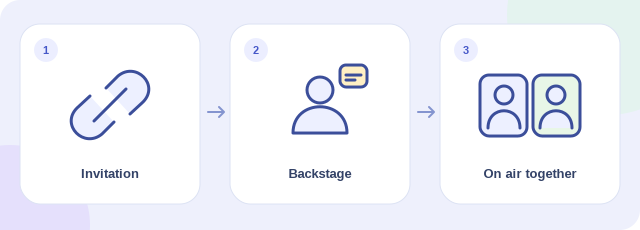
After checking your devices, choose Invite a guest and share the private link with that person. The guest checks their camera and microphone, then joins you backstage. Joining does not put them in the public broadcast: the presenter chooses Bring guest on air separately. You can return the guest backstage or disable their audio or video. One guest can join the current session; the invitation lasts eight hours. Requesting the link again returns the same invitation. Revoking it disconnects the guest and invalidates the old link. Ending the video broadcast closes the session. Live video instructions →
Open the catalogue in your mobile browser, choose a station and press Play. Check the volume and any connected headphones. Background playback depends on your device and browser. Mobile listening guide →
No. Adding a station uses an existing external audio stream. Creating one gives you your own station with the service’s broadcasting tools. Compare the options →
Prepare your show topic, music and a device for using the studio. For a talk show, check your microphone and headphones. Before going live, test the broadcast as a listener. Set up your audio →
The catalog includes stations from Zvukradio and Radio Browser. Playback depends on the stream and browser. Manage your stations and broadcasts in your account.

Spain · MP3 · 128 kbps
Listen to Radio Topo online on Zvukradio. Country: Spain. Stream format: MP3 · 128 kbps.